Nano Banana 2 prompts: ready prompts for your photos
Nano Banana is best at one thing: changing everything around the person in a photo while keeping the face the same. So a good prompt is an instruction for your photo: what to keep, what to change and in what format. Below: the formula, ready prompts, real outputs and a way to try each prompt in Nano Banana 2 in the Twelver chat.
Short answer: the formula
Action + what to keep + scene, light and style + format. The most important line is “do not change my face”: without it the model may “improve” the face until the person no longer looks like themselves.
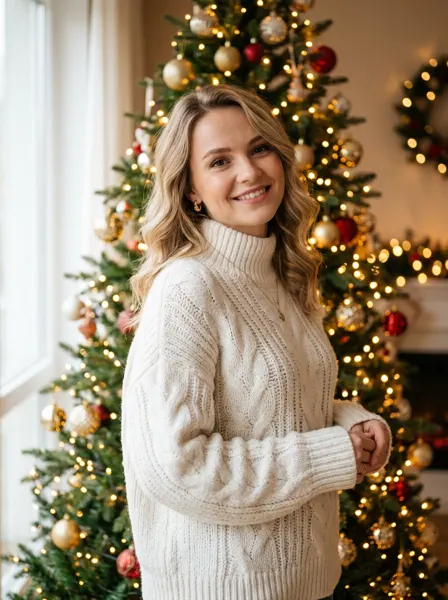

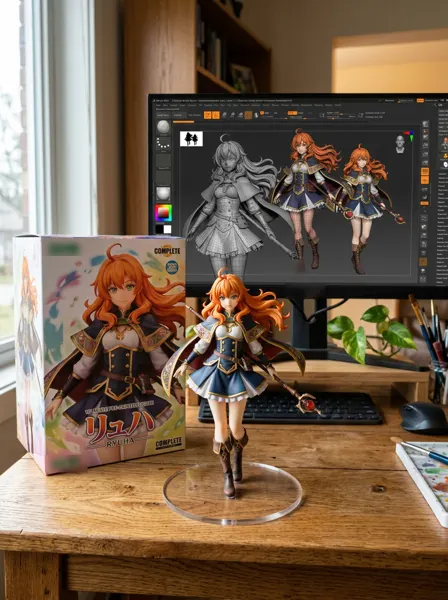
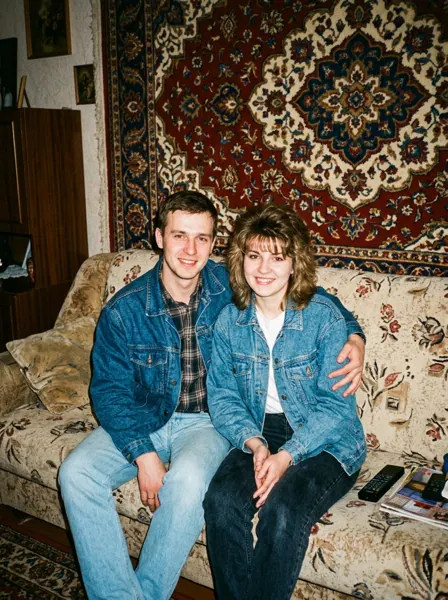
Generated in Twelver on 5 October 2026 with Nano Banana 2 (1K, 3 : 4) from the holiday, business, figurine and 90s prompts, without a source photo, so the people are invented. Logos the model drew were blurred.
Ready Nano Banana prompts
Upload your photo, copy a prompt and swap the details. “Try it” opens the chat with Nano Banana 2 and the prompt filled in; attach the photo to the message.
3 prompts
Portrait by the tree
Using my photo, make a holiday portrait: me by a decorated Christmas tree in a cosy knitted sweater, warm fairy lights blurred into bokeh, soft light. Keep my face, hair and features unchanged. Waist-up, photorealistic, 3:4.
Snowy evening walk
Move me from this photo to a snowy street in the evening: big snowflakes, warm shop windows and lights behind. I wear a long coat and a scarf. Do not change my face. Photorealistic, waist-up, vertical 4:5.
Family card from several photos
Combine the people from these photos into one family holiday picture: everyone by the fireplace next to the tree, in matching red sweaters. Keep every face exactly. Warm light, photorealistic, 3:2.
Upload 2 to 5 photos.
3 prompts
Studio portrait
Turn my photo into a studio portrait: plain beige background, soft diffused light, neat hair. Keep my facial features and face shape. Chest-up, photorealistic, 85 mm, 4:5.
Business headshot
Business headshot from my photo: navy suit without a tie, plain grey studio background, soft key light from the left, confident look at the camera. Keep my face, beard and hair. Chest-up, photorealistic, 3:4.
A couple from two separate photos
Combine the people from these two photos into one couple photo: standing arm in arm on an embankment at sunset. Keep both faces exactly. Warm light, photorealistic, 4:5.
3 prompts
Collectible figurine
Turn the person in the photo into a 1/7 scale collectible figurine on a round clear base on a desk, with its box beside it and its 3D model on the monitor behind. Photorealistic.
90s family photo
Redo our photo as a 90s family snapshot: denim jackets, a sofa, a patterned rug on the wall, direct flash, film grain and faded colours. Do not change our faces. 3:4.
Generations portrait
Make a generations portrait: four versions of the person in the photo side by side, as a child, a teenager, an adult and an elderly person, all recognisable. Studio background, soft light, 16:9.
2 prompts
White background for a marketplace
Put the product from the photo on a clean white background with a soft shadow below, centred and filling 80% of the frame. Do not change the product, its labels or colour. 3:4.
Product in a kitchen
Place the product from the photo on a wooden table in a bright kitchen, morning light from the window, a cup of coffee beside it. Keep the product and its labels. Photorealistic, 4:5.
When the face changes
| What happens | What to add |
|---|---|
| The face looks like someone else | “Do not change the face or its features, it is the same person” |
| Skin looks filtered | “natural skin, no retouching, photorealistic” |
| Hair changed | “keep the hairstyle and hair colour” |
| Two people look alike in a couple shot | Upload a separate photo of each and write “keep both faces exactly” |
Try it
In Twelver, Nano Banana 2.1 (Gemini Nano Banana 2.1) is the main image engine on every plan. It edits one photo or combines 2–5, in 14 aspect ratios and sizes from 1K to 4K. Your first images fit in the starter tokens you get on your first visit.
More: Nano Banana 2, Ideogram, all models.
Frequently asked questions
How do you write a Nano Banana prompt?
How do I stop Nano Banana from changing my face?
Can Nano Banana combine two photos into a couple shot?
Where can I try these prompts?
Try it yourself
Everything in this guide runs inside Twelver
One chat for text, images, video, music and voice — no separate services or subscriptions.
Open Twelver chat